Process Log
Overview
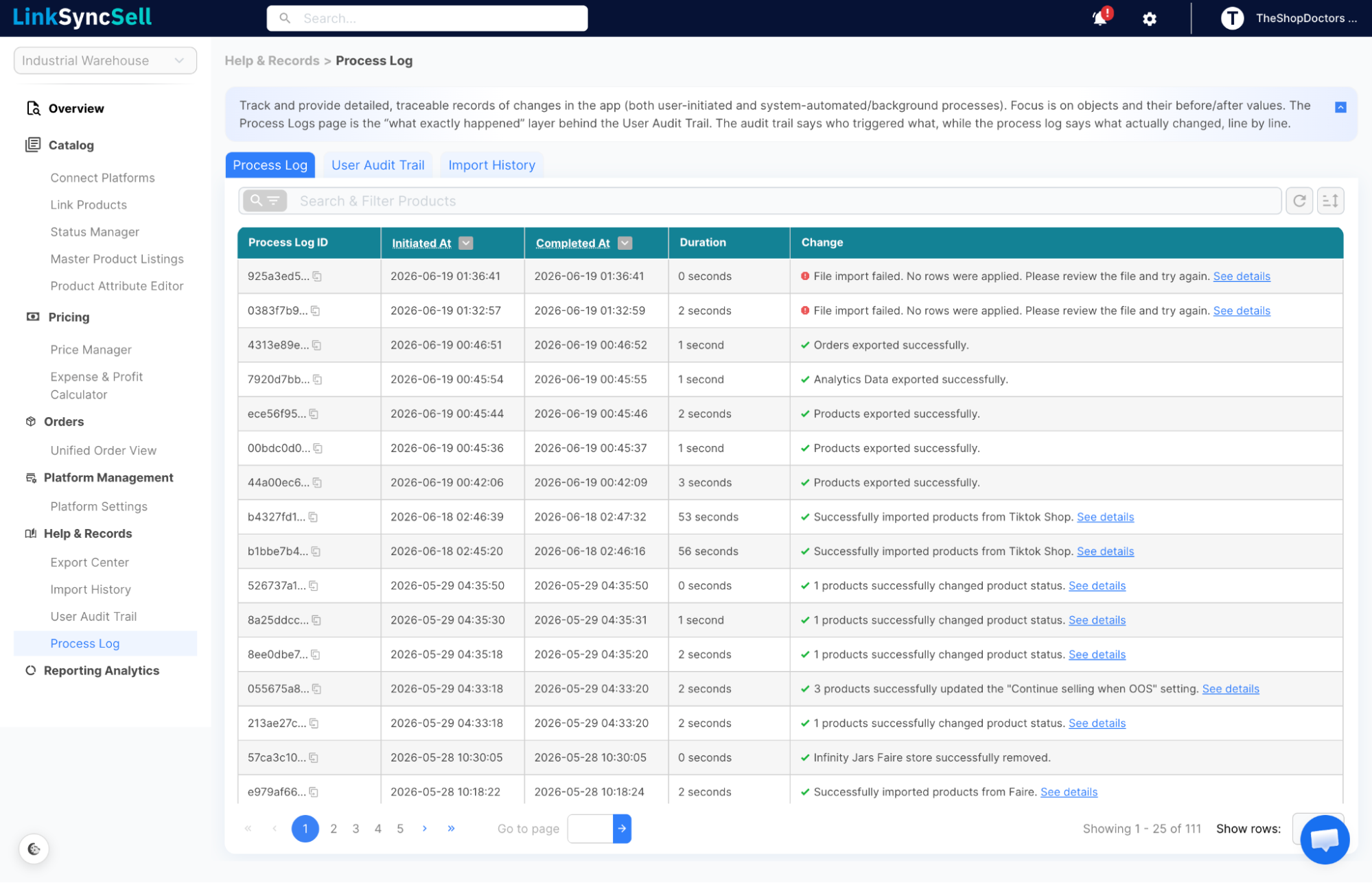
While the User Audit Trail tells you who took an action, the Process Log tells you the details of what happened - including old values, new values, success/failure status, and error messages.
How to Access
Navigate to Help & Records → Process Log in the left sidebar.
What You'll See
- Process Log ID - unique identifier for this log entry
- Initiated At - when the process started
- Completed At - when it finished
- Duration - how long it took
- Change - summary of what changed - click to expand for full detail
The expanded Change view shows:
- What specific records were affected
- Old value → New value (where applicable)
- Error details if the process failed
Key Use Cases
Confirming a bulk update worked correctly
After a bulk price change, find the Process Log entry and expand it to confirm each row was updated as expected.
Diagnosing a failed import
If an import encounters errors, the Process Log will show only the rows that failed and the specific error for each failed row. Successfully processed rows are not listed individually.
If all rows are processed successfully, the Process Log will display the message: "File import processed successfully. All rows applied without errors."
Troubleshooting sync issues
Sync jobs appear in the Process Log. If products aren't updating on a platform, check here for error messages.
