TikTok Shop - Editing a Product Listing
Overview
Edit your TikTok Shop product listings from LinkSyncSell. Keep in mind that TikTok reviews every listing change before it goes live - this is a TikTok requirement that applies to all sellers.
Prerequisites
- TikTok Shop connected in Connect Platforms
- An active subscription (product editing and posting require an active plan)
Steps
- Go to Catalog > Product Attribute Editor
- Select the TikTok Shop tab
- Find the product you want to edit
- Click the product to open its editor
- Make your changes in the relevant sections
- Choose how to save
Editing Sections
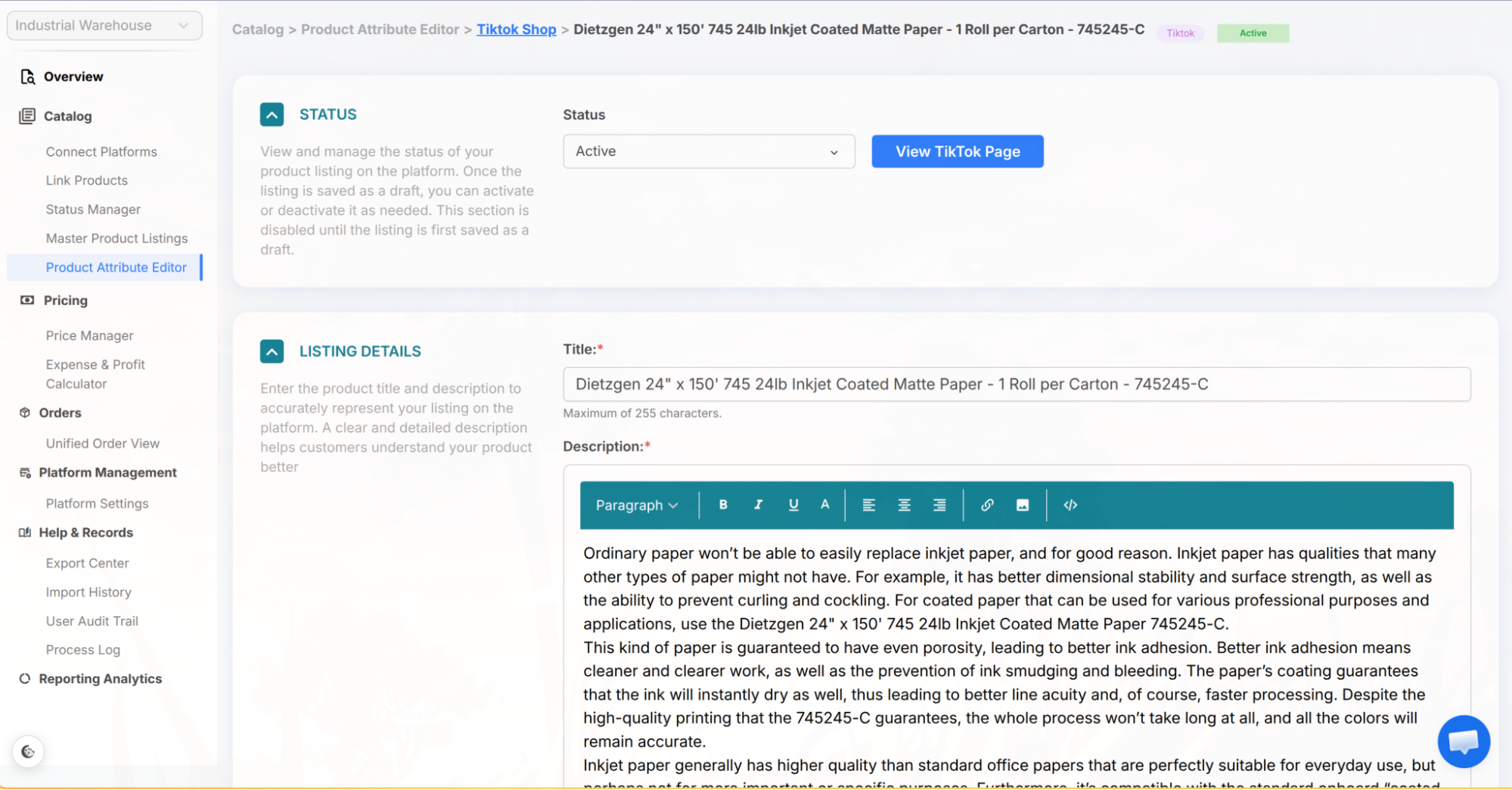
- Status - set the listing to Active, Draft, or Inactive. This section also has a View TikTok Page button that opens the live listing in TikTok Seller Center in a new tab.
- Listing Details - title and description
- Category - TikTok Shop product category, plus the brand and category-specific attributes (these appear once a category is selected)
- Product Media - photos and a product video
- Variants, Pricing & Inventory - variant options, price per variant, inventory, and shipping (package weight and dimensions, plus a free-shipping option)
- Size Chart - add or select a size chart for the listing
- Product Compliance - category-specific compliance and certification information
Important: The Reviewing Process
📝
Note: Every time you post a change to TikTok Shop - including edits to an existing listing - the listing moves to a Pending status (this is TikTok's "Reviewing" stage). TikTok's team reviews all changes before they go live. Once approved, the listing returns to Active with your updates applied.
📝
Note: You cannot skip the review process on TikTok Shop. Plan ahead if you have time-sensitive pricing or listing changes.
Saving Your Changes
- Save Local Draft (App) - saves your changes in LinkSyncSell only; nothing is sent to TikTok Shop. This appears for listings that aren't published to TikTok Shop yet (new or local listings).
- Save Draft (TikTok Shop) - saves the listing on TikTok Shop with its status set to Draft. Available while the listing is still a draft (or not yet published) and you're not switching it to Active or Inactive.
- Save & Post to TikTok Shop - saves and pushes all your changes to TikTok Shop. The listing will enter the Pending (Reviewing) state until TikTok approves it. When you edit an already-published listing, this is usually the only save option you'll see.
Other Actions
- Duplicate Listing - creates a copy of this listing.
- Abandon Changes - discards unsaved edits.
- Delete Product Listing - removes the listing from LinkSyncSell only. Available for listings that exist just in the app and aren't published to TikTok Shop.
Tips & Notes
💡
Tip: If you need to update several TikTok listings at once, batch your edits and submit them together. This way, they all go through review at the same time.
📝
Note: All changes are logged in the Process Log and Audit Trail.
Troubleshooting
Listing is stuck in Pending (Reviewing).
This is normal - TikTok's review can take anywhere from a few hours to a few days. There's no way to speed up the process. Check TikTok Shop Seller Center for updates on the review.
Listing shows a "Failed" status.
This means TikTok rejected the listing during review. Edit the listing to fix the flagged issue and resubmit.
Listing shows a "Freeze" status.
This indicates a serious policy violation. You'll need to address this directly in TikTok Shop Seller Center - LinkSyncSell can't resolve a frozen listing.
