Understanding Your Plan
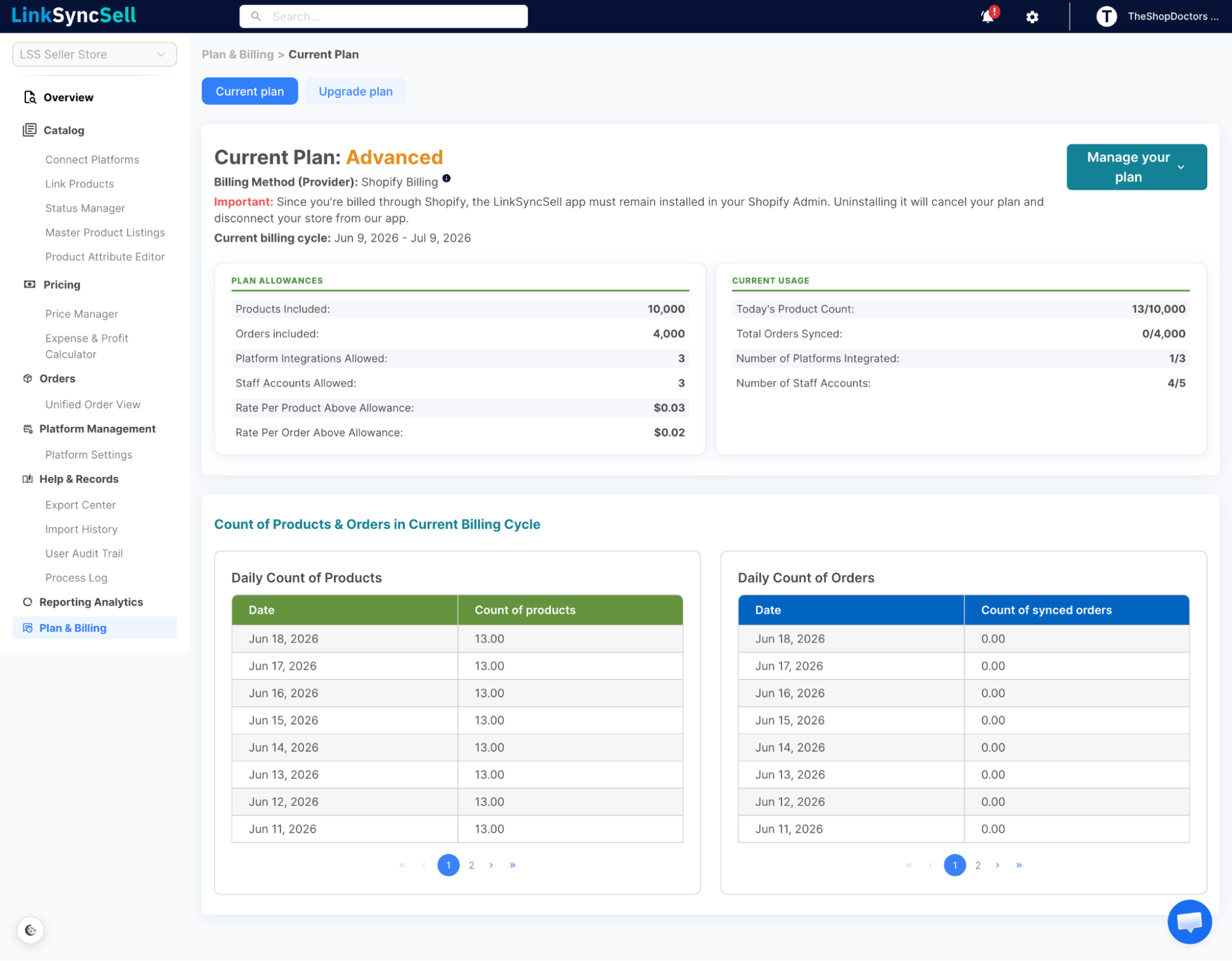
Overview
The Plan & Billing section shows your current subscription, what features you have access to, and lets you manage your plan and payment details.
How to Access
Navigate to Plan & Billing in the left sidebar (or through Company Settings → Plan & Billing).
Available Plans
LinkSyncSell offers tiered plans based on the number of platforms you connect and the volume of products you manage. Plan options are visible on the Plan & Billing page - compare them to find the right fit for your business.
What Your Plan Affects
- Number of platforms you can connect
- Number of products/variants supported
- Access to advanced features (bulk tools, analytics, API limits)
- Number of user seats
Viewing Your Current Plan
Your current plan details are shown at the top of the Plan & Billing page, including:
- Plan name
- Renewal date
- What's included
Your Plan Usage and Allowances
The Plan & Billing page also shows how much of your plan you're currently using, measured against your plan's allowances. Each plan includes a set allowance for:
- Products: the number of billable products you can manage
- Orders: the number of orders covered in a billing cycle
- Platform integrations: how many platforms you can connect
- Staff accounts: how many team members you can add
Alongside these allowances, the page displays your current usage and daily count tables (such as the daily count of products and daily count of orders) so you can see how your usage is trending across the billing cycle.
When You Exceed an Allowance
If your usage goes over one of your plan's allowances, LinkSyncSell lets you know rather than cutting you off mid-work:
- A red alert banner appears across the top of the page (for example, "You have exceeded your plan's product allowance limit. To avoid additional charges, upgrade to a plan with a higher product allowance.").
- Usage above your allowance may be billed at the plan's per-product or per-order overage rate, shown on the Plan & Billing page.
- The banner links you to available plans so you can upgrade to a higher allowance. You can dismiss the banner, but the underlying usage doesn't change until you upgrade or reduce usage.
