Upgrading, Downgrading & Canceling
Overview
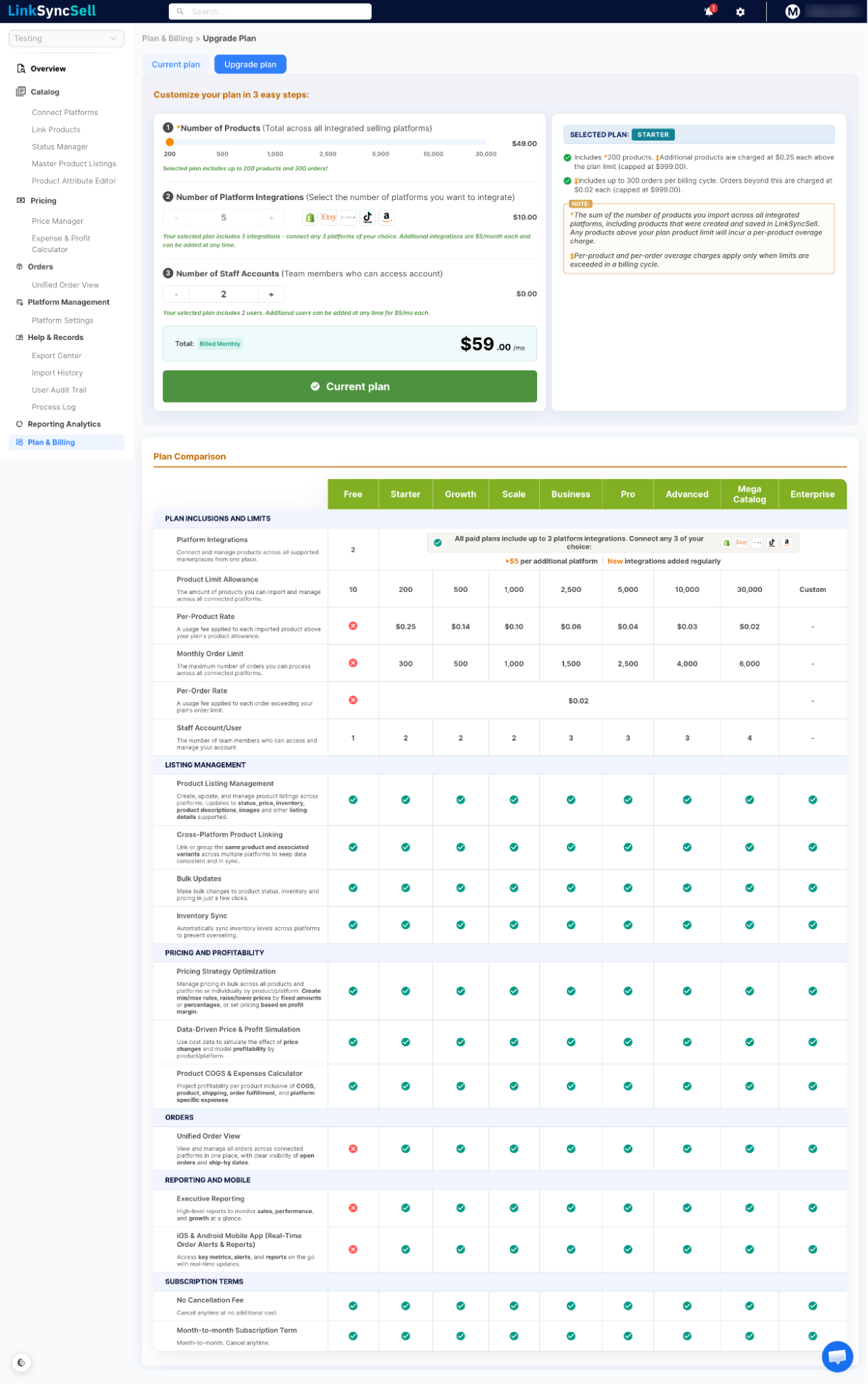
You can change your plan at any time through the Plan & Billing page.
Upgrading Your Plan
- Navigate to Plan & Billing
- Review the available plans
- Select the number of products that match your business (plan depends on number of products)
- Confirm and complete payment
Upgrades take effect immediately. You'll have access to the new plan's features right away.
Downgrading Your Plan
Downgrades take effect at the end of your current billing period. You'll continue on your current plan until the renewal date, then switch to the lower tier.
📝
If your current product or platform count exceeds the limits of the lower plan, you'll need to disconnect platforms or archive products before the downgrade takes effect.
Canceling Your Plan
To cancel your subscription:
- Navigate to Plan & Billing
- Click Cancel Plan
- Follow the confirmation steps
Your access continues through the end of the current billing period. After that, your account will be downgraded to a limited free state and you'll lose access to paid features.
💡
Before canceling, export any data you want to keep (prices, expenses, orders). Downloads from the Export Center will no longer be available after the billing period ends.
